Fallout 76 Carry Weight and Stash Management Guide
The inventory planner keeps a record of what you carry and what you have put in the stash. It does not read your character. When you pick something up, scrap it, or move it in the game, change the recorded count to match. Crafting subtracts that record. A count you have not updated makes the crafting plan look ready when you are short, or short when you already hold the item.
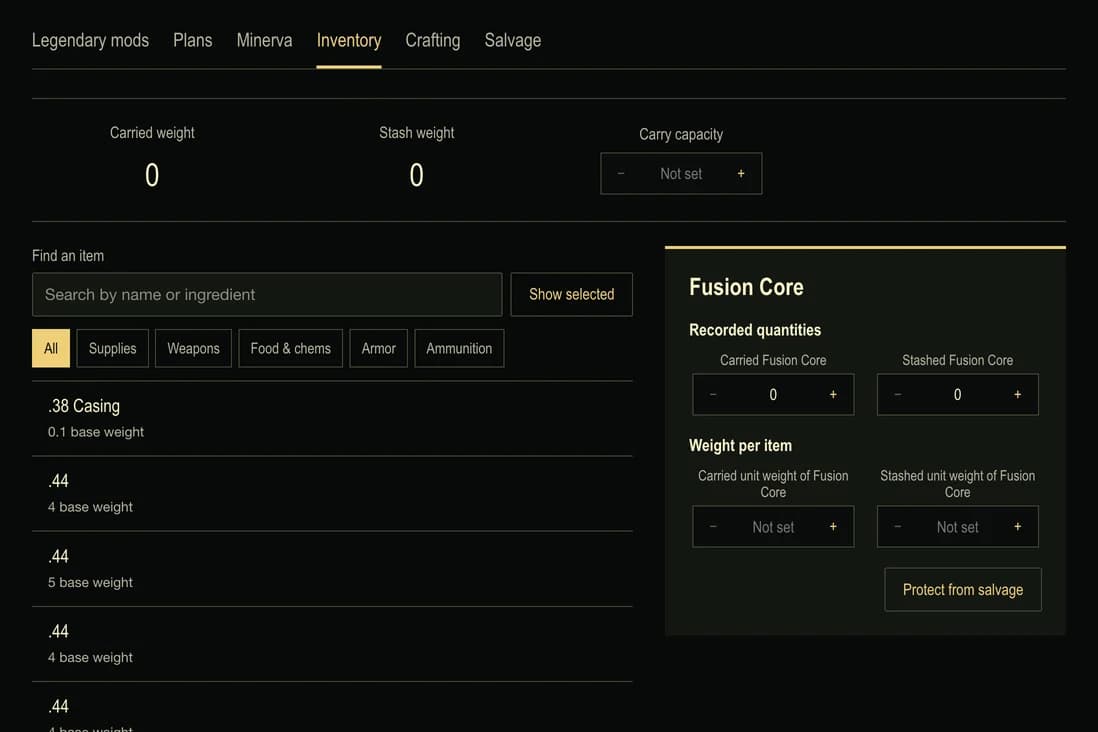
In Fallout 76, a Stash box stores items you are not carrying, and you can build one in your C.A.M.P. Open that box when you want to move an item out of your carried inventory, as Bethesda's explains. After you move an item in the game, update the Carried and Stash entries in the inventory planner to match.
Keep carried weight and stash weight apart
Deathclaw Hide has a base weight of 8. Record 2 carried and 3 in the stash. Crafting sees 5 hides, because ownership is the two counts added together. The weight totals stay separate: carried weight is 16 and stash weight is 24. When you move a hide from what you are carrying into the stash, change those two counts or the carried total will keep charging you for weight you have already put away.
Move to stash sends the whole recorded stack to the stash. With 2 carried and 3 stashed, that button leaves 0 carried and 5 in the stash. Carry instead sends all 5 back onto you. Protection and any weight you typed stay with the item. When you only moved some of them, edit the carried and stash quantities yourself. The buttons are for the whole stack, not for a single hide out of the five. The Carried, Stash, For crafting and Protected filters only change which rows you see.
Type the weight shown in the game
Base weight does not include your perks or item modifications. The carried weight per item and the stash weight per item are separate entries. Use the figure shown on that item in the game. A perk that lightens what you are carrying does not change the stash entry unless the stash entry shows a different weight too. Use base weights clears the numbers you typed and returns the item to its base weight of 8 for a Deathclaw Hide. The recorded quantity stays.
The ammunition Fusion Core made by the flux recipe has no base weight in the planner. Open it from inventory. Until you enter the weight the game shows, that core is left out of the total and named in the notice that the totals are incomplete. Enter the carried weight and the stash weight separately when those figures differ. A zero you enter counts as a real weight. An empty field leaves the total incomplete.
Compare capacity with what you are carrying
Carry capacity is the number you enter from your character. The planner does not calculate it from your other records. If carried weight is under that number, the summary shows how much capacity is left. If carried weight is over it, the summary shows how far over. Stash weight is not subtracted from carry capacity. A heavy stash can leave you under the carry number, and a heavy pack can put you over it while the stash is nearly empty.
Set the capacity again after armor or a perk changes it in the game. Recording another item does not rewrite that number.
Protect what the crafting plan still needs
The For crafting view lists recorded items the crafting plan still uses, including junk that yields a material you are missing. Protect from salvage when you are not willing to scrap that stack. Salvage will not mark a protected item as scrapped, and Plan salvage stays off until you remove the protection. The protected flag survives Move to stash and Carry instead, so putting a hide in the stash does not silently offer it for scrap.
Plan salvage, when it is available, copies the carried count plus the stash count into the salvage plan. It does not remove the items. Scrap them in the game first, then record that scrap. Choosing junk covers yields and intact ingredients. Crafting materials is where those owned counts are subtracted from the recipes you selected.
Clear recorded inventory removes carried and stash counts, the weights you typed and protection. Crafting recipes stay. Loose material totals that were typed for items you never put in this inventory stay as well. Anything this inventory was supplying is removed from those owned totals, because the record no longer says you hold it.
Base caps value is not a vendor price
Stimpak lists a base value of 30 caps. Blood Pack lists 20. Deathclaw Hide lists 15. A vendor does not pay that base value. Another player's price is a separate deal. Dropping something to get under your carry weight is a decision about the weight totals above. Check the vendor when you actually sell. Weight and caps value explains the same split for other items.
Share a preview, then keep it on purpose
Share plan copies the recorded items, protection, the weights you entered and the carry capacity. Opening the link on the inventory page shows those figures as a preview. Your saved plan is not changed, and the quantities cannot be edited while the preview is up. Keep this plan replaces the inventory record and the carry capacity. Owned material totals that came from inventory are recalculated from the kept counts. Crafting recipes and the salvage selection remain. Use my saved plan drops the preview.
A link opened on another tool is refused. A link that cannot be read leaves the saved plan unchanged. If a saved plan on this device cannot be opened, it stays in place until you choose Replace saved data, and that replacement cannot bring the old save back. If the browser cannot store changes, they remain in this tab. Copy the share link before you close it.