Fallout 76 Junk Guide: What to Scrap and What to Keep
Junk salvage shows what a junk item breaks into and compares that yield with the crafting plan you already recorded. Selecting junk here does not scrap it in the game. The quantities are your record of what you hold and of what you have decided to scrap after you do the scrap yourself. Update them when the pile in the game changes, or the preview will describe junk you have already broken down.
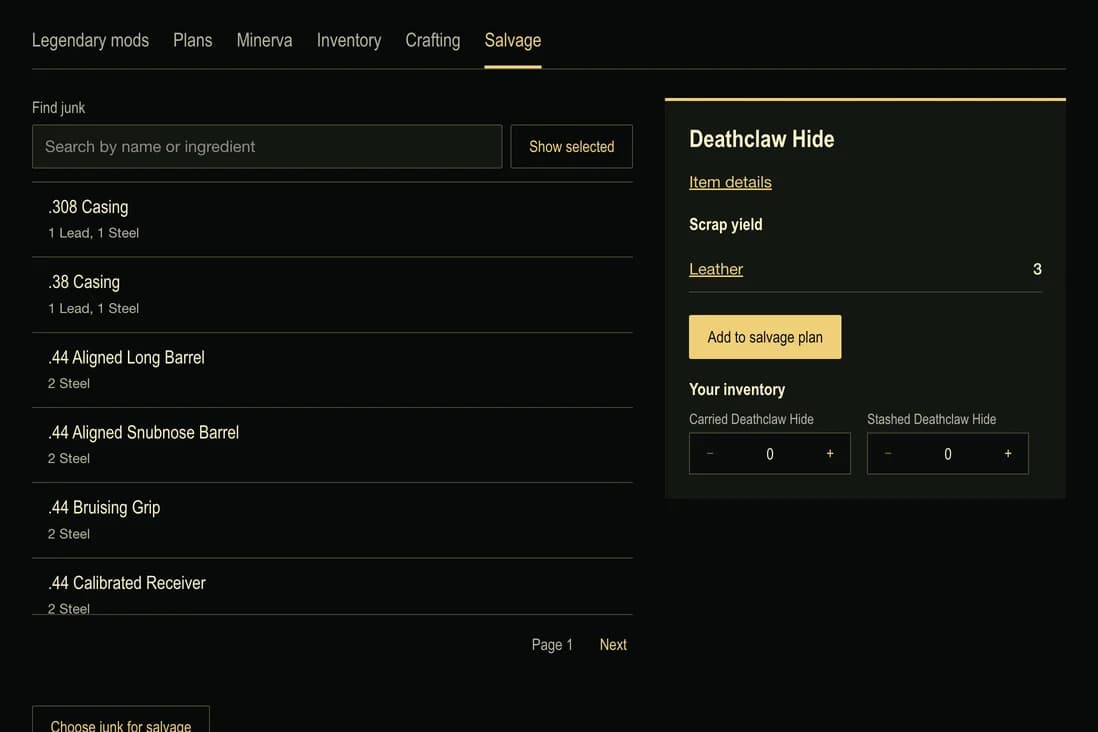
Read the named yield
Deathclaw Hide yields 3 Leather. Two hides yield 6 Leather. The preview multiplies that stated yield by the quantity you selected. Open the hide from its salvage row and Leather from the material search.
If Leather is already in the crafting plan, the preview shows how much you own now and how much of that line would remain after the scrap. When the crafting plan does not use that material, the still-needed cell reads Not in crafting plan. A stack of Leather is then just Leather. It is not treated as progress on a recipe that never asked for it. If an item has no scrap components, the preview does not invent a yield.
Leave intact anything the recipe names
Some junk is itself an ingredient. Insect Repellent includes 1 Bloatfly Gland. That gland yields 2 Acid. If you own the gland and select it for salvage, the repellent goes from having the gland to still needing 1. The preview says scrapping this junk increases what your crafting plan needs. Acid is a different material, so the acid you would gain does not stand in for the gland the recipe asked you to keep.
Weaponized Nuka-Cola Quantum Ammo needs 1 Nuka-Cola Quantum per craft. That bottle is not scrap. When you want the ammo, learn Plan: Weaponized Nuka-Cola Schematics and keep the bottle for the craft.
Protect an item, then scrap on purpose
Use the scrap action at a Weapons Workbench, Armor Workbench or Tinker’s Workbench. Review the components and confirm the junk you intend to break down. Bethesda’s lists which stations support scrapping. Before choosing Scrap All, put any bulk item you want to keep intact in your Stash; Bethesda’s explains that carried bulk material is also broken down.
In inventory, Protect from salvage blocks that item. Plan salvage stays unavailable while the protection is on. Only an unprotected item with a known yield can be copied into the salvage plan, and the copied quantity is the carried count plus the stash count you recorded. That sum should match what you are holding before you break it down.
Mark as scrapped is the record you update after the scrap happens in the game. The recorded junk decreases and its components are added to your owned materials. If any selected item is protected, or you do not hold enough of it, the whole update is refused and nothing is partly removed. Clear plan takes the junk off the salvage selection and leaves inventory and owned materials unchanged. Use the mark only for junk you have already scrapped, then look at the new owned totals before you collect another batch.
Where the scrap goes in your records
Carried junk is reduced first, then the stash. Record 1 Deathclaw Hide carried and 2 in the stash, then mark 2 as scrapped. The remaining hide stays in the stash, and 6 Leather is added. When Leather is already in your recorded inventory, those 6 are added to the carried Leather. The stash count, protection and any weight you entered for Leather stay as they were. When Leather is not an inventory row, the 6 is added to the owned materials the crafting plan subtracts.
After a successful update the salvage selection is cleared, so the same hides are not applied again on the next visit. Return to the crafting plan and check the missing Leather against what you scrapped. Plan crafting materials explains how that owned number is combined across recipes. Carry weight is where the hide's carried and stash counts, and the protection flag, are edited.
Share the salvage selection
Share plan copies the junk and quantities on this salvage plan. It does not copy your inventory counts or your carry capacity. Someone who opens the link sees a preview. Their saved plan stays until they choose Keep this plan, and the preview cannot be edited. Keeping it replaces their salvage selection only. Use my saved plan drops the preview. A link opened on another tool is refused, and a link that cannot be read leaves the saved plan unchanged. Fix a highlighted quantity before you copy the link.