Fallout 76 Legendary Mod Crafting Guide: Plan Boxes and Materials
Choose the legendary effect you want before gathering its crafting ingredients. A box already in your inventory can cover part of your target, while a learned recipe lets you prepare more boxes when you have the supplies. Those are different kinds of progress. The legendary mod planner keeps wanted boxes, owned boxes and learned recipes separate so that one does not stand in for another.
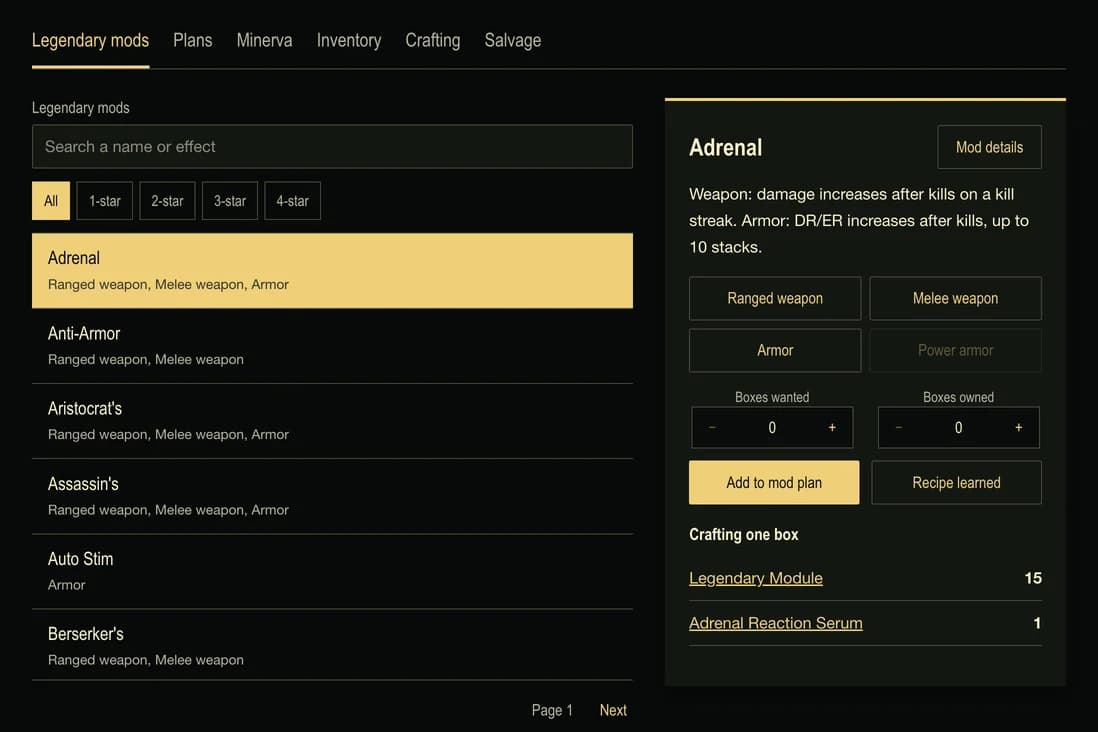
Start with the item you intend to improve and the effect you need. Select the matching equipment family in the planner, then review the mod description. A family match is a first check rather than a promise that every item in that family can take the effect. Check the available legendary slot on the particular item before applying a box in the game.
Count the boxes you still need
Suppose your target is three Anti-Armor boxes, and you already own one. Enter three wanted and one owned. The remaining target is two boxes, so the planner counts the ingredients for two crafts rather than three. Owning more boxes than you want removes the crafting demand; it does not turn the extra boxes into materials or spend them automatically.
One Anti-Armor box requires 15 Legendary Modules and five Black Titanium. Two boxes therefore require 30 modules and ten Black Titanium before accounting for the supplies you already have. Enter ten owned modules and five owned Black Titanium, and the remaining requirements become 20 modules and five Black Titanium.
The ingredients belong to the particular mod recipe. A mod with an unfamiliar name or a different tier should not inherit another mod's ingredient list merely because both fit the same weapon. Open its details and read the required materials before adding it to a larger target.
Keep recipe knowledge separate
Scrapping legendary equipment can unlock a mod recipe. Craft learned mods at a Tinker’s Workbench, following Bethesda’s . Apply a compatible box at the station for its target equipment: Weapons Workbench, Armor Workbench or Power Armor Station. Bethesda’s lists the equipment handled by each station.
Mark Recipe learned only after you have unlocked that recipe in the game. Adding a desired box to the planner does not mark the recipe learned, and recording a box you obtained elsewhere does not imply you know how to craft it. The material target can remain in your plan while you work toward the unlock.
An unlearned selection is still useful for preparation: you can decide which materials to reserve and how the target fits alongside other crafts. It is not a confirmation that the crafting option is already available to your character. Review the learned state again before turning a shopping target into an in-game crafting session.
Combine mod costs with your other recipes
A collection of separate shopping lists can promise the same supplies to several crafts. The crafting planner instead combines ordinary recipes and planned legendary boxes before subtracting your owned materials. Your remaining amount reflects the combined target rather than a sum of independently discounted lists.
Use the recorded inventory for materials or intact items you are already tracking there. Carried and stashed amounts supply the same planning balance. Editing that recorded item changes its contribution to the combined plan; an older manually entered material amount is not added a second time.
Where an ingredient has a supported crafting recipe, an explicit ingredient choice can expand it into its own supplies. Keep that choice deliberate. Buying or gathering an ingredient and crafting it are different plans, and the nested crafting guide explains how owned intermediate items reduce the required sub-crafts.
Review armor and power-armor variants carefully
The planner keeps separately listed armor and power-armor effects distinct. A similarly named entry does not authorize copying the other entry's crafting cost. When a variant has no verified ingredient list, it remains a visible target with its cost unavailable; the combined shopping amount covers the selections whose costs are known.
That incomplete cost matters when deciding whether you have enough supplies. An absent ingredient list is not a free craft. Recording an already owned box can still satisfy that target without an estimated recipe, but acquiring additional boxes needs a confirmed source or recipe.
Gather, craft and return to the same target
Follow useful material links from the combined requirements. The salvage planner can compare a selected junk item's exact yield with those shortages. Preserve items needed intact by another recipe, and confirm a recorded scrap operation only after performing it in the game. The planner changes your recorded supplies rather than operating your character.
Learning a recipe, crafting a box and applying that box to equipment remain separate actions. The material totals on this page describe box crafting. They do not estimate application costs or random learning chances from missing information.
Share plan creates a link to the selected mod work. Opening the link presents a read-only preview and leaves the recipient's saved plan unchanged until they choose to keep it. Their other crafting, inventory and plan-collection records remain separate. Keep the wanted and owned quantities current as you obtain boxes, and the same target will continue to show what remains to prepare.