Fallout 76 Minerva budget: plan your gold bullion purchases
Choose the Minerva inventory list containing your target plans, add the unlocks you still need, and compare their combined cost with your gold bullion. The Minerva Budget uses each listed plan price and your Plan Collection, so a learned plan does not consume your planned budget.
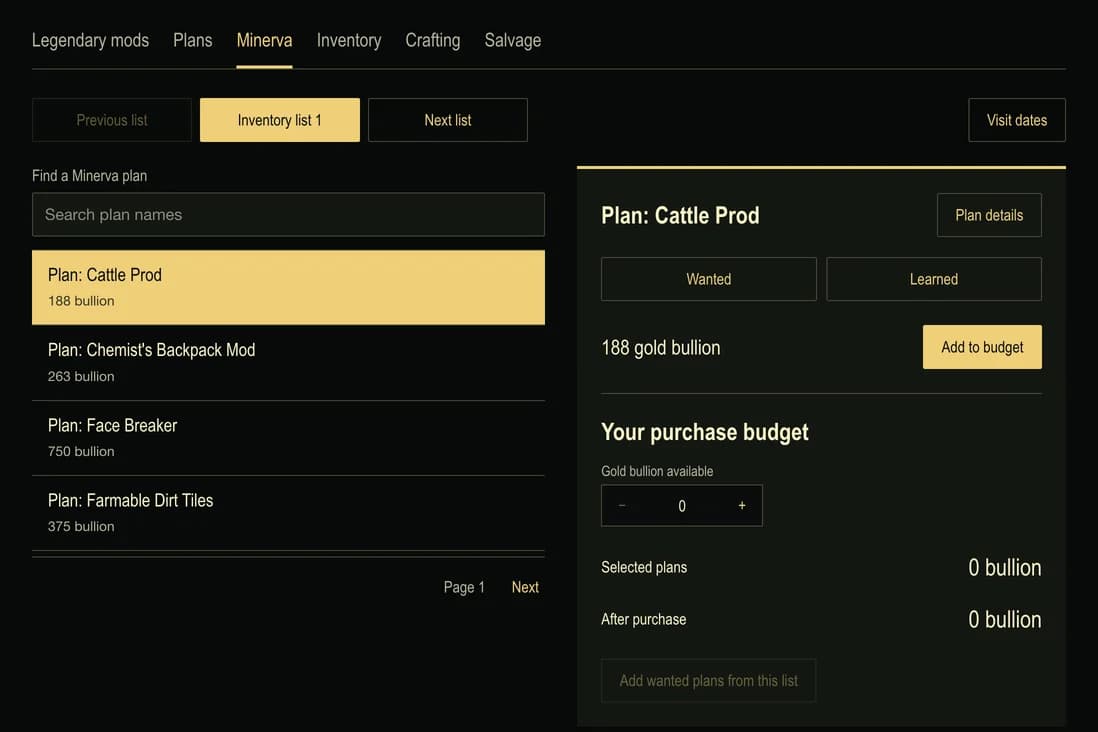
Minerva trades plans for Gold Bullion and rotates her offers. Bethesda introduced her in the , with Minerva’s Emporium and Minerva’s Big Sale as her two event formats.
Start with the correct inventory list
Minerva's lists contain different plans. Selecting a list changes the offers you are budgeting for; it does not buy anything or change the gold bullion in your game. A Big Sale combines the preceding three standard lists, so compare its actual contents rather than treating it as another small weekly list.
The inventory reference is useful even when you are planning ahead. It is separate from a confirmed visit schedule. A plan appearing in List 1 does not establish that List 1 is on sale today, and a historical date must not be used as a live location report.
Calculate the exact cost of your selections
Plan: Cattle Prod is listed at 188 gold bullion in List 1. Plan: Chemist's Backpack Mod is 263. Together they require 451. Entering 400 gold bullion leaves a shortfall of 51.
Use the offered prices rather than applying a blanket percentage discount yourself. Rounding is already present in individual list prices, and rounding a combined total can produce a different answer. The budget selects one learning copy of each plan; adding the same plan repeatedly does not inflate the total.
Exclude plans you already know
Mark a plan Learned only after learning it in the game. A selected plan with that status moves into the budget's excluded section. It remains identifiable, but its cost is removed from the purchase total. Changing its collection status restores the corresponding budgeting behavior.
Wanted plans are a separate shortlist. Add wanted plans from this list selects only the wanted plans that the chosen inventory actually offers. Plans wanted from another list remain in your collection, where you can continue comparing their sources.
Compare another visit without losing your choices
Changing the selected inventory list keeps your purchase selections. A plan absent from the new list appears under Outside this inventory list and contributes nothing to that list's cost. Follow Find its lists to see where it belongs, or remove it from the purchase selections.
This makes a wider shopping goal easier to divide across visits. Keep the complete wanted collection, then budget only the offers relevant to each list. The remaining-bullion figure is a calculation for that selection, not a transaction or an automatic update to your in-game balance.
Connect the purchase to a crafting goal
A purchased unlock may be only the beginning of the preparation. Follow its plan detail to a matching recipe when available, then use the Crafting Planner to combine material costs. Junk Salvage can help identify supplies, while the Inventory Planner shows the weight of what you have recorded.
Save or share a purchase budget
The selected list, bullion amount and chosen plans persist in this browser. A share link opens as a preview and does not overwrite an existing purchase budget automatically. Keeping the shared budget replaces its purchase inputs only; your separate learned/wanted collection still controls which selected plans are excluded.